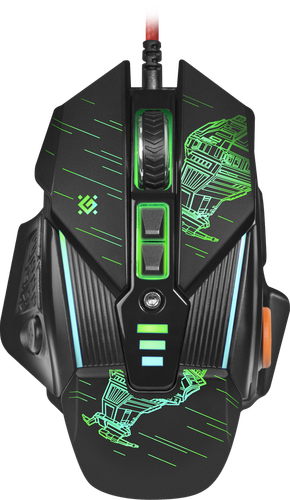
Characteristics Mouse wired Defender sTarx GM-390L [52390] black
General characteristics
Type
mouse
Model
Defender sTarx GM-390L
Manufacturer Code
[52390]
Appearance
Main Color
black
Backlight
multicolored
Fabric Cable Braiding
yes
Styling
none
Vertical Mouse
none
Control
Total Number of Buttons
8
Extra Buttons
side forward/backward, DPI/CPI switching, double-click
Custom Button Binds
yes
Mouse Memory
none
Number of Programmable Buttons
5 pcs
Inertial Scrolling
none
Silent Buttons
none
Sensor
Max Sensor Resolution
3200 DPI
Sensor Type
LED
Sensor Model
A704F
Speed
60 IPS
Max Acceleration
20 G
Sensor Operating Modes
1200 DPI, 2400 DPI, 1600 DPI, 3200 DPI
Design
Housing Material
plastic
Finish
matte plastic
Grip
for the right hand
Mouse Shape
ergonomic
Weight Adjustable
yes
Connection
Wireless Connection
none
Wired Connection
yes
PC Wired Connection Port
USB Type-A
Cable Length
1.5 m
Multi-Device Operation
none
Power
Power Supply
wired
Charging Station Included
none
Additional Information
Package Contents
documentation
Extra
metal legs
Quantity Included
1 pcs
Dimensions and Weight
Length
123 mm
Width
80 mm
Height
41 mm
Weight
160 g
Description
The Defender sTarx GM-390L wired mouse offers tremendous capability, providing rich functionality and cutting-edge technology. Thanks to the built-in Game Center software, you gain extensive possibilities, giving you access to any in-game actions. This is an optical mouse utilizing an LED sensor with a maximum resolution of 3200 dpi. This allows you to control any process with extreme precision. The mouse body features a resolution adjustment button, allowing operation in modes of 800 dpi, 1800 dpi, 2400 dpi, and 3200 dpi.
The Defender sTarx GM-390L mouse design includes 8 buttons, centered around programmable keys. The buttons are conveniently located so that the user can quickly switch resolution or use a button mapped to a specific set of actions. A set of weights is used to adjust the model's weight.