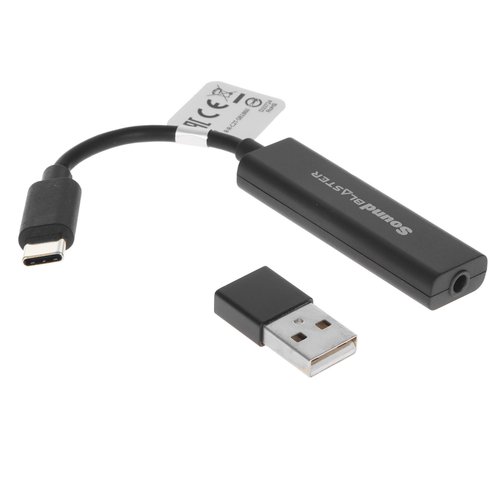
Characteristics External USB audio adapter Creative SB Play!4
General parameters
Type
USB audio adapter
Model
Creative SB Play!4
Manufacturer Code
[70SB186000000]
Main Color
black
Backlight
none
Basic characteristics
Microphone Phantom Power Supply
none
Support For ASIO
none
Sound Card Format
2.0
Built-In Headphone Amplifier
yes
Location
external
Playback
DAC Bit Depth
24 bit
Max DAC Frequency
192 kHz
Playback Signal-to-Noise Ratio
110 dB
Recording
ADC Bit Depth
24 bit
Max ADC Frequency
48 kHz
Connectors and Interfaces
Connection Type
USB Type-C, USB Type-A
Hi-Z Input
none
Analog Inputs
jack 3.5 mm (TRS 4-pin)
Analog Outputs
jack 3.5 mm (TRS 4-pin)
Digital Inputs
none
Digital Outputs
none
Additional Information
Supported OS
Android, iOS, macOS, Windows
Features
microphone noise suppression, LED signaling indicators, microphone mute button
Package Contents
USB Type-C to USB Type-A adapter, documentation
Dimensions
Length
138 mm
Width
16 mm
Height
8.2 mm
Description
The Creative SB Play!4 external sound card is a functional device in a compact form factor designed for high-quality audio transmission and recording. The model is built around a high-quality DAC with 24-bit resolution and a maximum sampling rate of 192 kHz. Combined with automatic tuning and two-way noise cancellation via the SmartComms Kit, this model is well-suited for video recording, creating content with an external microphone, or conference communication.
The Creative SB Play!4 external sound card features a durable enclosure and compact dimensions, making it suitable for travel. The model is compatible with various mobile and desktop devices, connecting via USB-A or USB-C. A 3.5 mm jack (TRS 4-pin) is provided for audio input/output. For convenience, a dedicated microphone mute button is located directly on the sound card.