Characteristics Graphics tablet Wacom Intuos Pro L
General characteristics
Type
graphics tablet
Model
Wacom Intuos Pro L
Manufacturer Code
[PTK870K0B]
Main Color
black
Connection Type
wired/wireless
Tablet
Input Method
pen
Workspace Width
311 mm
Work Area Length
216 mm
Tablet Resolution
5080 lpi
Total Number of Buttons
8 pcs
Number of Programmable Buttons
8 pcs
Support For Multi-Touch
yes
Stylus
Pen Type
passive
Stylus Type
Wacom Pro Pen 2
Pen Tilt Angle
60 deg
Pressure Sensitivity
8192 levels
Stylus Precision
0.4 mm
Pen Button Count
2 pcs
Replaceable Tips
none
Power Supply
none
Interfaces
Interface
USB, Bluetooth
Additional Information
Supported OS
Chrome OS, Mac OS X, Windows 10
Software Included
Wacom Intuos Pro Paper Edition
Package Contents
case
Power Supply Voltage
5 V
Dimensions
Length
430 mm
Width
287 mm
Thickness
8 mm
Weight
1.3 kg
Description
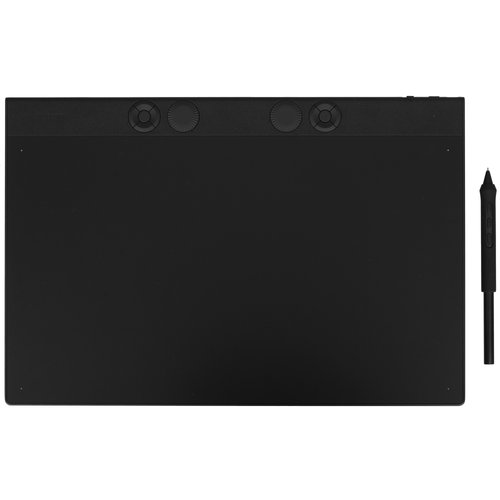
The Wacom Intuos Pro L (Large) [PTK870K0B] graphics tablet is presented in black. The dimensions of the device's working area exceed the A4 format at 311x216 mm. The surface detects pen position and tilt up to 60°, so strokes retain the desired thickness and angle even during quick sketching. Thanks to the high resolution, lines are smooth without stepping, and the Photoshop brush recognizes variations in stroke thickness and opacity.
The Wacom Intuos Pro L (Large) [PTK870K0B] graphics tablet comes with the Wacom Pro Pen 2. It features 8192 pressure levels and an accuracy of 0.4 mm, allowing you to vary line thickness and opacity. The stylus is equipped with two switches located under the first finger phalanx. The set includes 10 replacement nibs for the pen. The left side of the tablet features eight ExpressKey hardware keys and a Touch Ring. The buttons can be programmed for shortcut commands: brush change, zoom, file saving, and undo. The ring allows you to change brush size or stroke brightness. The graphics tablet offers two connection options: via cable and over Bluetooth. A single battery charge lasts for approximately 4 hours of operation. The tablet is compatible with devices running Windows 10, macOS, and Chrome OS.