Keyboard  wireless Acer OKR020

#4707669

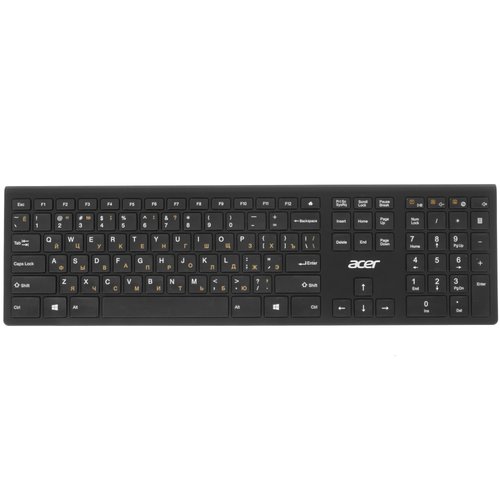
Keyboard wireless Acer OKR020

[scissor switch, number of keys - 109, radio channel, color black, included: 1 pcs] details

Not on sale

  • Characteristics
  • Feedback 0
  • Instructions and files

Characteristics Keyboard wireless Acer OKR020

Classification

Type
keyboard
Model
Acer OKR020
Manufacturer Code
[ZL.KBDEE.004]
Keyboard Type
scissor switch

Appearance

Main Color
black
Keyboard Layout Language
Russian, English
Low-Profile Keys
yes
Keyboard Backlight
none
Character Layout
front side

Switches

Switch lifespan (in million keystrokes)
5

Keys

Total Number of Keys
109
Double Shot
none
Round keys
none
Extra Keys
5 pcs
Extra Keys Type
multimedia, office
Silent Keys
none

Functionality

Display
none
Numeric Keypad
yes
Scroll Wheel
none
Function Key (Fn)
none
Keyboard Layout
ANSI
Support for Simultaneous Key Presses
none
Custom Key Binds
none
MAC OS Support
none

Design

Structural Features
island
Housing Material
plastic
Water Resistant
none
Wrist Rest
none
Phone stand
none
Keypad Layout
full-size
Noise Insulation
none

Connection and Interfaces

Connection Type
wireless
Connection Type
radio channel
Multi-Device Operation
none

Additional Information

Power Supply Type
AAA batteries
Package Contents
documentation, battery set, USB receiver
Quantity Included
1 pcs

Dimensions and Weight

Width
436.3 mm
Depth
124.6 mm
Height
25 mm
Keyboard Weight
430 g

Description

The Acer OKR020 keyboard features a convenient body design with a natural elevation at the top, contributing to comfortable work. It includes 109 keys, including 5 additional keys for quick access to multimedia functions, the calculator, and the Internet. These keys allow you to quickly perform certain tasks without using a mouse. The keyboard's numeric keypad helps work more efficiently with numerical data, making it an ideal assistant for accountants, cashiers, and engineers.
The scissor key mechanism provides fast key return, smooth travel, and quiet typing. The Acer OKR020 is a wireless keyboard that uses a USB receiver to connect to a computer port. Operating on a radio frequency, the miniature receiver ensures a reliable connection. The keyboard requires two AA batteries to operate.