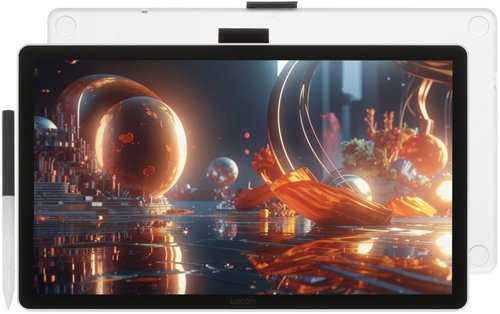
Characteristics Graphics monitor Wacom One 14 Pen Display
General characteristics
Type
graphics monitor
Model
Wacom One 14 Pen Display
Manufacturer Code
[DTC141W0]
Main Color
white
Connection Type
wired
Tablet
Input Method
pen
Workspace Width
309 mm
Work Area Length
174 mm
Size
A4
Tablet Resolution
2540 lpi
Total Number of Buttons
0 pcs
Number of Programmable Buttons
0 pcs
Support For Multi-Touch
none
Screen
Display Matrix Manufacturing Technology
IPS
Screen Resolution
1920x1080
Screen Size
14 in
Brightness
285 cd/m²
Response
16 ms
Horizontal Field of View
178 deg
Vertical Field of View
178 deg
Contrast
1000:1
Aspect Ratio
16:9
Color Range
98% sRGB
Stylus
Pen Type
passive
Stylus Type
Wacom One Standard Pen
Pen Tilt Angle
60 deg
Pressure Sensitivity
4096 levels
Pen Button Count
2 pcs
Replaceable Tips
yes
Power Supply
none
Interfaces
Interface
USB Type-C
Video Ports
DisplayPort
Additional Information
Supported OS
Chrome OS, macOS 13 and above, Windows 10 and newer
Software Included
none
Package Contents
replacement tips (3 pcs), stylus, documentation, USB cable
Dimensions
Length
201 mm
Width
336 mm
Thickness
10 mm
Weight
0.75 kg
Description
The Wacom One 14 Pen Display graphic monitor in a white body is suitable for beginners and professional digital artists, designers, animators, and retouchers. The model features a 14-inch screen with a resolution of 1920x1080 pixels and a standard 16:9 aspect ratio. The IPS panel ensures wide viewing angles of 178° horizontally and vertically, preventing image distortion when viewed from any angle. A 98% sRGB color gamut guarantees the reproduction of subtle shades. The 16 ms response time provides smooth rendering of drawn strokes without lag or trailing. The Wacom One 14 Pen Display graphic monitor includes a Wacom One Standard Pen battery-free stylus. It operates using electromagnetic resonance technology and requires no charging. The pen recognizes 4096 levels of pressure, allowing you to adjust line thickness, opacity, and saturation, simulating the feel of standard pencils, ink, or artistic brushes. A tilt angle of up to 60° allows you to create soft shading and artistic hatching with the side of the nib.