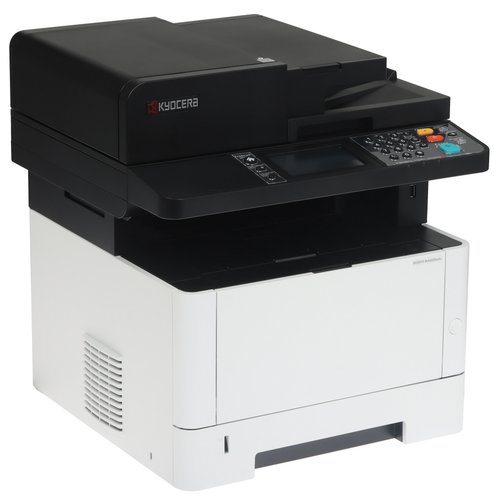
Laser MFP Kyocera MA4000wifx

#5649238

Laser MFP Kyocera MA4000wifx

[black and white printing, A4, 1200x1200 dpi, b/w - 40 pgs/min (A4), ADF, fax, Ethernet (RJ-45), USB host, USB Type-B, Wi-Fi] details

Not on sale

  • Characteristics
  • Feedback 2
  • Instructions and files

Characteristics Laser MFP Kyocera MA4000wifx

General characteristics

Type
laser MFP
Model
Kyocera MA4000wifx
Manufacturer Code
[110C1D3NL1]
Main Color
black
Extra Color
white
Device Functions
copier, scanner, fax, printer
Intended Use
for office use
Placement
tabletop

Hardware

RAM
2048 MB
CPU Frequency
1000 MHz

Printer

Printing Technology
laser
Print Color
black and white
Biggest Paper Size for Printing
A4
Max B/W Printing Resolution
1200x1200 dpi
Black-and-White Printing Speed (Pages Per Minute)
40 pgs/min (A4)
Time to Print First Black and White Page
6.4 s
Recommended Monthly Print Volume
2000 p.
Max Monthly Print Volume
80000
Auto Two-Sided Printing
yes
Photo Printing
none

Scanner

Scanner Type
flatbed/sheet-fed
Scan Sensor Type
CIS
Scanner Optical Resolution
600x600 dpi
Scanning Speed (B/W)
40 pic/min (A4)
Color Scanning Speed
23 images/min (A4)
Biggest Supported Paper Size (Scanning)
A4
Auto-Feeder Device
yes
Auto-Feed Device Type
bidirectional
Automatic Document Feeder Capacity
50
Scanning Functions
scan to PC, FTP scanning, WSD (WIA) scanning, scan to USB drive, TWAIN/WIA scanning, scan to email
Grayscale Levels
8

Copier

Max Copier Resolution
600x600 dpi
Scaling
25-400 %
Scaling Step
1 %
Max Number of Copies Per Cycle
999
Extra Copying Features
image setting, N-in-1 copy, copying of identity documents

Fax

Fax Function
yes
Fax Memory
256 pages
Max Fax Resolution
400x400 dpi
Max Transfer Speed
33.6 kbit

Trays

Feed Volume
350 sheets
Output Tray Capacity
150 sheets
Manual Feed Tray Capacity
100 sheets
Supported Media Density
60-220 g/m²
Prints On
plain paper
Ability to Install Additional Trays
yes
Maximum Number of Additional Trays
2

Consumables

Cartridge Count
1 pcs
Cartridges Model
Kyocera TK-1270
Black Cartridge Yield
10000 pages

Interfaces

Connectors/Ports
Ethernet (RJ-45), USB host, USB Type-B, Wi-Fi
Memory Card Reader
yes
Memory Card Support
SD, SDHC

Support

Compatibility
macOS 10.9 and higher, Chrome OS, Windows 11, Windows 10, Windows 8, Windows 8.1
Fonts and Input Languages
XPS, PCL 6, IBM ProPrinter, KPDL 3 (PostScript 3 compatible), Epson LQ-850
Mobile Printing Solutions
Wi-Fi Direct, Mopria, Kyocera Mobile Print, AirPrint, Microsoft Universal Print
Direct Printing
yes
Display Menu Language
Russian, English

Power Consumption and Power

Power Type and Voltage
220-240V/50-60Hz
Power Consumption When in Use
574.4 W
Idle Power Consumption
11 W
Sleep Mode Power Consumption
0.4 W

Additional Information

On-Screen Data Display
display
Noise Level When Active
52 dB
Standby Noise Level
29 dB
Package Contents
power cable, documentation, starter cartridge

Dimensions and Weight

Width
417 mm
Height
437 mm
Depth
412 mm
Weight
19.5 kg

Dimensions and Weight in Packaging

Package Width
555 mm
Package Height
541 mm
Packaging Depth
572 mm
Packaged Weight
24 kg

Description

The Kyocera MA4000wifx laser MFP combines the functions of a copier, printer, scanner, and fax. The model supports monochrome printing and is suitable for offices with medium to high document workflow. In printer mode, it prints up to 40 ppm of A4 format. Thanks to a resolution of 1200×1200 dpi, small fonts, barcodes, and other fine details will be clearly visible on the sheets. Automatic duplex printing saves up to 50% of paper, reducing costs and waste volume. The flatbed/sheet-fed scanner can scan single sheets or large stacks of documents. The automatic feeder saves time, eliminating the need to feed each page manually one by one. You can load a stack at once and start the program. The device allows sending scanned documents directly to a USB flash drive or email. In copier mode, the model can produce up to 999 copies in a single cycle.
The Kyocera MA4000wifx laser MFP can handle media with a density of 60–163 g/m². The equipment is compatible with PCs running Chrome OS, Windows, and macOS. It connects to the host device via USB and USB host. Ethernet and Wi-Fi interfaces allow integrating the MFP into a local internet network, enabling all employees to send commands to the device from their PCs. The MFP also supports direct printing from a smartphone.