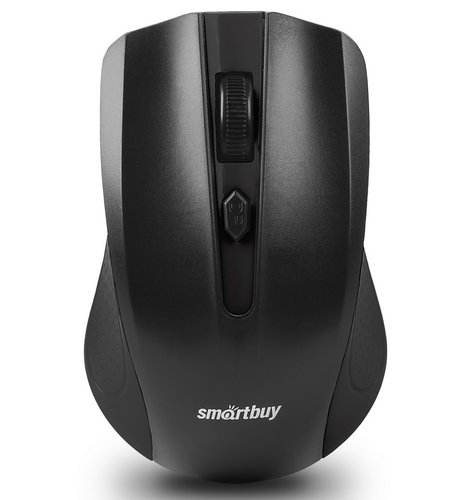
Characteristics Mouse wireless Smartbuy ONE 352 [SBM-352AG-K] black
General characteristics
Type
mouse
Model
Smartbuy ONE 352
Manufacturer Code
[SBM-352AG-K]
Appearance
Main Color
black
Backlight
none
Styling
none
Vertical Mouse
none
Control
Total Number of Buttons
4
Extra Buttons
DPI/CPI switching
Custom Button Binds
none
Mouse Memory
none
Inertial Scrolling
none
Silent Buttons
none
Sensor
Max Sensor Resolution
1600 DPI
Sensor Type
LED
Sensor Operating Modes
1200 DPI, 800 DPI, 1600 DPI
Design
Housing Material
plastic
Finish
matte plastic
Grip
for the right hand, for left hand
Mouse Shape
symmetrical
Weight Adjustable
none
Connection
Wireless Connection
yes
Wired Connection
none
Wireless Connection Type
radio channel
Dongle (Receiver) Connector
USB Type-A
Wireless Range
10 m
Multi-Device Operation
none
Power
Power Supply
AAA batteries x 2 pcs.
Charging Station Included
none
Mouse Battery Life
up to 6 months
Additional Information
Package Contents
documentation, battery set, USB receiver
Extra
sleep mode
Quantity Included
1 pcs
Dimensions and Weight
Length
102 mm
Width
66 mm
Height
38 mm
Weight
55 g
Description
The Smartbuy ONE 352 wireless mouse is a lightweight (55 g) and compact (66x38x102 mm) computer mouse equipped with everything needed for comfortable computer work in any environment. Fully autonomous operation of the device is provided by two AAA batteries included in the package. To ensure their charge lasts as long as possible, support for automatic power-off technology during inactivity is provided. Fast wireless connection of the mouse to a computer is guaranteed by a USB receiver, with no need for the user to install additional software.
The Smartbuy ONE 352 wireless mouse with an extended range of up to 10 meters is housed in a high-quality plastic body with a matte finish that maintains the device's aesthetic appeal throughout its service life. The model is equally comfortable to use with both the right and left hand thanks to its symmetrical shape. In addition to the standard three buttons, the body features a fourth button responsible for changing the optical LED sensor's resolution.